Lift Access
All lifts at 202KB operate using the Comelit App. Please ensure you have the app installed and set up for access.
Comelit App
Each storage unit is entitled to a maximum of 3 Comelit access.
To submit any additional or change requests, please email lease@workstore.com.sg with your storage unit details. Our team will respond to your request within 3 to 5 business days.
Please note that an administrative fee of $20.00 + GST applies for each change request.
Download the “Comelit” app from the Apple App Store or Google Play.
Open the Comelit app and create a new Account.
For a step-by-step demonstration, please refer to the PDF guide or video guide
If you’re having trouble signing in, try the following steps:
- Force close the app and reopen it.
- If that doesn’t help, restart your device or reinstall the app.
- Still can’t sign in? Try resetting your password via the Comelit app.
Please note that login credentials are case sensitive.
Click on “Forgot Password” on the login page, then follow the link sent to your email to reset it.
To access your new or additional unit in the app, follow these steps:
- Tap the three lines at the top left corner of the screen.
- Go to My System > Manage Systems.
- Tap the “+” (plus) icon.
- Select the appropriate floor level.
- Choose Door Entry – End to complete setup.Once added, you’ll be able to access the new unit using the Comelit app as usual.
For a step-by-step demonstration, please refer to the PDF guide or video guide
No. Comelit access is limited to one email address per mobile device at any given time.
Work Plus Store App Account
Download the “Work Plus Store” app from the Apple App Store or Google Play. Then, check your email (including your spam or junk folder) for a welcome email from Work Plus Store App with your login details and instructions to get started.
- If you’re having trouble signing in, try the following steps:
- Force close the app and reopen it.
- If that doesn’t help, restart your device or reinstall the app.
- Still can’t sign in? Try resetting your password via the WPS app.
Please note that login credentials are case sensitive.
Click on “Forgot Password” on the login page, then follow the link sent to your email to reset it.
If you are experiencing issues with the Work Plus Store App, please email us at lease@workstore.com.sg with the following details:
- Account Name
- Storage Unit Number
- Email Address
Our team will respond as soon as possible during office hours (Monday to Friday, 9:00 AM – 6:00 PM). Please note that responses may be slower outside of these hours, but we will attend to your request promptly on the next business day.
Digital Lock
Access to all business storage unit digital locks is managed through the Work Plus Store App.
As the digital lock operates via your mobile device, we strongly recommend bringing your phone with you whenever you step out of the unit to avoid being locked out.
Alternatively, you can access the unit by entering your 7-digit door passcode. Please note that we are unable to customize this code, so we advise you to memorize it or store it in a secure place.
Try force-closing the app and reopening it. If that doesn’t work, restart your device or reinstall the app.
The digital lock battery may be low. You can recharge the lock by following these steps:
- Retrieve the extension cord, adapter, and micro-USB cable from Locker 29, located at the Level 1 Communal Area (PW: 1010)
- Plug the extension cord into the nearest power outlet and connect the micro-USB cable to the digital lock
For a step-by-step demonstration, please refer to the video guide
Access to the facility is granted via your 7-digit door passcode, as shown below:
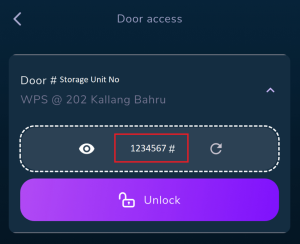
Make sure to memorize your door passcode or save it somewhere other than your phone—just in case your phone ends up locked inside your storage unit. If you’re unable to retrieve your code or need help getting back in, please email us at lease@workstore.com.sg with the following details:
- Account Name
- Storage Unit Number
- Email Address (associated with your account)
Our team will respond as soon as possible during office hours: Monday to Friday, 9:00 AM – 6:00 PM
Please note: Responses may be delayed outside these hours, but we’ll attend to your request promptly on the next business day.
Feedback on Property/Facilities and Maintenance Related
Non-urgent issues include things like flickering lights, minor leaks, or air conditioning not cooling properly. Urgent issues are situations that pose immediate safety risks, such as power outages, pipe burst and water flooding.
For non-urgent issues like corridor or air conditioning problems, broken lights, motion sensors or cleanliness issues, just submit your feedback through the Work Plus Store App. The team will get back to you within 3 to 7 days.
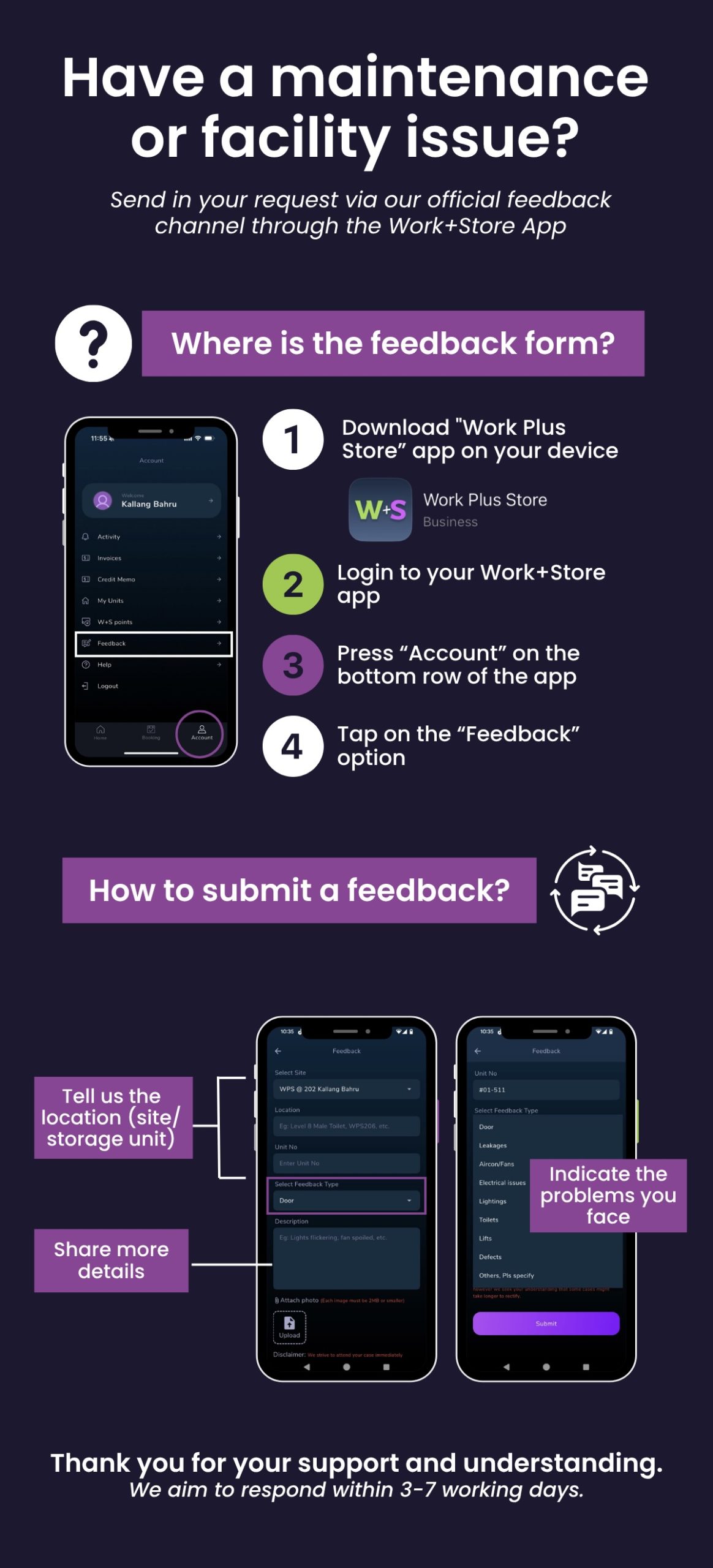
For urgent issues outside of business hours, please refer to the welcome email provided in your welcome email or you may contact the Security helpline at 64880252 / 64880253
Booking of Facilities (Live Streaming Studio/Photography Studio)
You can book the facilities through the Work Plus Store App. Just make sure you have enough points for the booking. For 1 hour usage for each room, 650 points are required.
1. Make payment to UEN: 201907332N
2. Email lease@workstore.com.sg with the following details:
- Account Name and Storage Unit Number
- Number of points you’d like to purchase
- Payment screenshot or reference number
Please note: Our team will respond within 3 to 5 business days once payment has been made and verified.
On-site Amenities
Last Mile Station/Incoming and Outgoing of goods
You’ll need to be physically present to receive or send your goods. If you’re unable to be there, please make the necessary arrangements with your courier or delivery provider.
For updates on delivery or collection times, please contact your courier or delivery provider directly.
Throwing of domestic waste/bulky waste disposal
There is a Bin Center on Level 1, accessible via the loading bay. Please note:
A) Only domestic waste is accepted.
B) Domestic waste should be tightly sealed in proper trash bags.
C) Boxes must be emptied and flattened before disposal.
D) Bulky waste (like pallets and furniture) is not accepted.
Parking Related
Please download the LOT$ App and submit your application through the platform.
For assistance, including checking your application status, you may contact LHN Parking at 6856 6600 or email enquiries@lhnparking.com.sg
For general parking enquiries, you can:
Call LHN Parking at 6856 6600 or email them at enquiries@lhnparking.com.sg
Change / Update of Contact Details
Please email lease@workstore.com.sg with the following information:
- Building Location and Account Name
- Existing Contact Details (Name, Email Address, Contact Number)
- New Contact Details to be Updated (Name, Email Address, Contact Number)
Our team will update the records and respond within 3 to 5 business days.
Check-out of Storage unit
The Security Deposit refund will be processed within 60 days from the date the Takeover Form is completed.
If you require further assistance, please email lease@workstore.com.sg. Our team will respond within 3 to 5 business days.
Payment & Billing Enquiries
For any enquiries related to payment, billing, outstanding balances, or GIRO arrangements, please email our finance team at lease@workstore.com.sg.
Our team will respond within 3 to 5 business days.